About the company: what is OpenWeather?
General overview


OpenWeather (headquartered in London) is a team of IT-intellectuals that create pivotal products for business using climate data. For each point on the globe, OpenWeather provides hyperlocal minutely forecast, historical data, current state, and from short-term to annual forecasted weather data. All data is available via industry standard APIs.
OpenWeather Ltd. has more than 9 million users including Fortune 500 companies and thousands of other businesses globally.
Get started
How to get an API key?
To use OpenWeather services, you first need to create an OpenWeather account. Once your account is created and your email address is verified, you will receive your personal API key (APPID), which is required to access our APIs and other OpenWeather services. Getting started is easy:
- Sign up for an OpenWeather account to get an API key (APPID) on your account page
- Verify your email address using the confirmation email we sent you. If you do not receive it, you can resend the verification email from your profile settings one hour after registration
- After verification, check your Inbox again to find our welcome email that contains your API key and important information
Congratulations! Now you have a Free OpenWeather account and can start using our services. We also recommend reading our API documentation to learn how to integrate and use our APIs effectively.
What products and types of data can I request?
For each point on the globe, OpenWeather provides hyperlocal minute-by-minute forecasts, historical data, current conditions, and short-term to annual forecasts. All data is available via industry-standard APIs.
Make just one API call and get all your essential weather data for a specific location with the One Call API, endpoint version 4.0.
- Current weather
- Minute-by-minute forecast data for the next 60 minutes
- 15-minute forecast data for the next 48 hours
- Hourly weather timelines spanning 47+ years years of history and 48 hours of forecast
- Daily weather timelines spanning 47+ years years of history and up to 1.5 years ahead
- Detailed weather alert information from national agencies
For more functionality, please consider our generous professional subscriptions.
Professional collections:
Current Weather and Forecasts Collection
How to get:
- APIs (you can request data for geographic coordinates, ZIP codes, city name, city ID, number of cities)
- Bulk Download (download already collected and regularly updated data for a list of global locations; available for premium subscriptions)
How to get:
- On-the-fly bulks for customised lists of coordinates
- Marketplace of prepared data sets (coordinates, cities, zip codes) - History Bulk (47+ years back), History Forecast Bulk (from 7 Oct 2017)
- APIs to a timestamp / a period (subscriptions with different limits on calls and depth of archive)
- Solar Irradiance API
- Solar Panels Energy Prediction
- Global Weather Alerts
- Road Risk API
- Global Precipitation Maps - Forecast and historical data
- Weather Maps 2.0 with 1-hour step
Detailed information about all our products can be found on the Pricing page.
Do I need to activate my API key?
Your API key will be activated automatically, up to 2 hours after your successful registration. We invite you to read the API documentation that explains how to use our APIs.
How can I use an API key in API calls?
To authorise a request from you and process it, we require you to use your unique API key in each API call.
In order to do this, add your API key as an appid parameter to the GET request, like in the following example:
api.openweathermap.org/data/2.5/weather?id=524901&appid=YOUR_API_KEYJust use your API key instead of “YOUR_API_KEY” with your personal API key, it can be found in your personal account on the “API keys” page. You can also create additional API keys there.
Where can I find my API key(s) and generate additional ones?
Your API key can be found in your personal account on the “API keys” page. You can always create additional API keys there.
How many keys can I create?
You can create as many keys as you like. Any API key associated with your account can be used with all subscribed products. API call limits are applied at the account level, not per API key. Usage from all API keys associated with your account is combined and counted toward the same account limits. When choosing a subscription plan, make sure to consider the total expected API usage across all your API keys and subscribed products, as subscription plans have different daily and per-minute API call limits.
More information about subscription limits can be found on the Pricing page.
How to delete an API key?
You can delete unnecessary API keys but please note that your account with us should have at least 1 API key at any time.
To find your API key, go to your personal account and click the “API keys” tab
When you have more than 1 registered API key, there will be an option to delete an API key.
How often is the weather data updated?
The frequency of weather data updates depends on your subscription. Please find more information on our “Detailed pricing” page, the “Weather API data update” part.
What should I do if I subscribed before creating an account?
If you subscribed before creating an OpenWeather account, an account was automatically created using the email address you provided during the subscription process.
To access your account, you need to reset your password:
- Click “Sign in” in the top-right corner of the website
- Click on "Select Lost your password? Click here to recover"
- Follow the instructions sent to your email address
What should I do if I didn't receive the confirmation email?
If you haven't received the confirmation email, try the following:
- Check your Spam or Junk folder. If you find the email there, mark it as Not Spam to ensure future emails from OpenWeather are delivered to your Inbox
- Wait at least 1 hour after registration. You can then resend the verification email from your account settings: https://home.openweathermap.org/home
- If you still don't receive the email, you can send another verification email 3 hours after your previous resend request
If you still haven't received the verification email after following these steps, please contact us at info@openweathermap.org for assistance.
About One Call API
What is a One Call API?
One Call API is a unified weather intelligence API designed to give developers, digital products, and enterprise teams access to current weather, short-term forecasts, long-range daily outlooks, historical weather records, and official weather alerts through a single integration.
One Call API, endpoint version 4.0, simplifies weather data access by consolidating multiple temporal layers of weather information into one coherent API product. With a single API key and a standard request model based on geographic coordinates, teams can access:
- Current weather conditions
- Minute-by-minute forecast data for the next 60 minutes
- 15-minute forecast data for the next 48 hours
- Hourly weather timelines spanning 47+ years years of history and 48 hours of forecast
- Daily weather timelines spanning 47+ years years of history and up to 1.5 years ahead
- Detailed weather alert information from national agencies
This combination helps businesses reduce integration complexity, shorten development time, and create richer weather-aware experiences across consumer, commercial, and industrial use cases.
One Call API, endpoint version 4.0, is included in the One Call API subscription with the "pay as you call" subscription type. Please note that you do not need to subscribe to any other OpenWeather subscription plans to get access to the One Call API, endpoint version 4.0. If you are ready to subscribe to the One Call API, please refer to the Pricing page.
How much does a subscription to the One Call API cost?
Subscription to the One Call API allows you to pay only for the number of API calls made to this product. 1,000 API calls per day are included for free. Our system sums up the number of calls that were in excess of the free limit (1,000 calls per day). You will be automatically charged at the end of your subscription month.
If you unsubscribe before the end of your subscription month, then you will be charged at the time of unsubscribing.
Please refer to the Pricing page to find information about the actual price for calls to One Call API.
How to start using the One Call API?
First, please create your account by signing up with your email if you haven't created an OpenWeather account yet, and find API keys in the 'API keys’ tab.
Second, on the Pricing page, click the 'Subscribe' button in the "One Call API" section. Fill out a short billing form and complete your subscription. Please note that you do not need to sign up for any other subscriptions to get access to the One Call API.
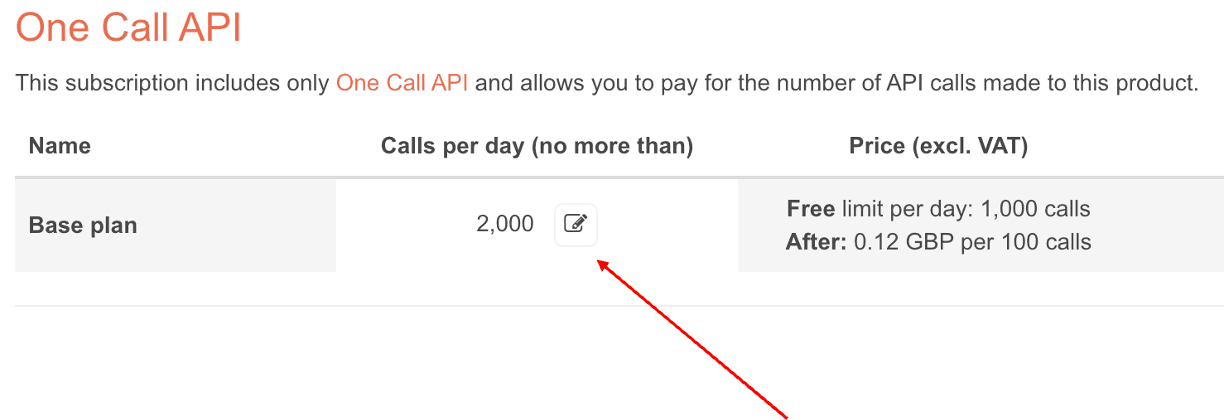
Congratulations! Now you can start using the One Call API. Please note that the limit of 2,000 API calls per day is set by default. You can always change this limit at the "Billing plan" tab in your Personal account.
Before you subscribe to our service, please read the Terms and conditions of sale, Privacy policy, and Websites' terms and conditions of use.
Third, make an API call according to the One Call API documentation.
Professional API collections
What is Professional API collections?
The Professional API collections include several products in each subscription plan. Unlike the "Pay as you Call" subscription type, professional subscriptions have a fix price per month and API call limits (number of API calls per minute and number of API calls per month).
The Professional API collections contain access to weather historical data, current and various forecasts. These collections also allow users to request weather maps and get weather data not only via API, but with other instruments.
I want to start using of the professional subscriptions. Where do I begin?
It is easy and takes a couple of steps.
First, please create your account by signing up with your email and find API keys in the ‘API keys’ tab.
On the Pricing page, choose a proper subscription, click 'Subscribe'. Fill out a short billing form, check the details and complete your subscription. You can also subscribe from the settings page in the ‘Billing plans’ section.
For bank transfer or any other individual conditions, please contact our team.
Before you subscribe to our service, please read Terms and conditions of sale, Privacy policy, and Websites terms and conditions of use.
What is the depth of historical weather data that you provide?
We offer historical weather data for any location for 47+ years back (since 1st January 1979). You can find more information about specific products in the Historical Weather Collection section of our “Pricing” page.
Do professional subscription plans provide access to historical data?
The Historical Weather Collection provides access to 47+ years of historical data - please see our Pricing page.
Can I download the missed historical data?
At OpenWeather, we understand the importance of reliable access to weather data for your operations. To ensure data integrity and availability, our systems are designed to store historical weather data for a specified period. Exclusively for Enterprise tariff users, we provide the opportunity to download missed data free of charge by contacting our support team at info@openweathermap.org. We recommend regularly downloading and backing up your data to avoid any potential disruptions.
For personalised assistance with data recovery, please feel free to get in touch with us.
How do I choose the right subscription?
The structure of our Pricing is quite simple.
The Current Weather and Forecasts Collection provides access to a range of products such as current weather, forecasts, short-term historical data, weather maps and other products.
We provide a completely Free plan. If its functionality is not enough for the size of your applications, we suggest a variety of subscriptions with ability to call APIs more intensively, higher availability of service (up to 99.9%) and premium level of support.
The Historical Weather Collection provides access to up 47+ years’ worth of detailed historical weather data for any location. You can request data via APIs or by a one-time export of historical data for a list of locations.
If you need an advice on choosing the correct subscription, please contact our team for assistance.
Can I subscribe for more than one month?
Yes, we support the annual/biannual and other options. Please contact our team for details.
I need more information about the API call limits of my professional subscription.
The number of API calls you are allowed to make depends on the subscription you choose.
For any professional subscription you should to maintain your usage below both per-minute and per-month limits.
What happens if I exceed the API calls limit of my professional subscription?
For Free plan
We will notify you and ask you to either migrate to a subscription plan that meets your needs or reduce a number of API calls accordingly. We expect you to take one or another action to avoid suspending of your account.
For users with paid plans
We always contact you to find a suitable solution for you.
How will I be charged for my subscription for recurring monthly payments?
For monthly recurring payments
You will be charged a fixed monthly fee based on the subscription plan you select on the “Pricing” page. In this case, the fee will be taken from your payment card. In your first month, you will be charged immediately after subscribing. The next payment will be a month later, and so on. The fee is subject to change, but we always notify you beforehand.
You can subscribe here.
For long-term subscriptions via manual invoicing
In case of manual invoicing, the payment process is discussed personally with each customer.
If you want to set up a long-term subscription, please contact our support team.
Can you customise an API?
We have a rich experience of cooperation with corporate customers providing them with an individual approach and personalised service. We are ready to discuss and estimate any customisations. It is possible for the Enterprise license holders. For more details, please contact us.
How to unsubscribe from your service?
If you would like to unsubscribe, please log in to your account on our website, then use the “Unsubscribe” button opposite your active plan in your personal account. After cancellation your subscription will still remain active until the end of the month for which you have paid.
If you pay by manual invoicing and would like to cancel your subscription, please contact our support team.
"Pay as you call" subscription type and what it includes
What is "Pay as you call" subscription type? What does this subscription include?
The "Pay as you call" subscription type is a subscription type that allows you to pay only for the number of API calls made to the product. This subscription type applies to One Call API and Solar Irradiance API. Please pay attention that each of the products has separate "pay as you call" subscription and price.
If you are ready to subscribe to the "Pay as you call" subscription type, please refer to the Pricing page.
I want to start using "Pay as you call" subscription type. Where do I begin?
Please pay attention that the "Pay as you call" subscription type applies to the One Call API and the Solar Irradiance API.
Starting the "Pay as you call" subscription is easy and takes a couple of steps. First, please create your account by signing up with your email and find API keys in the ‘API keys’ tab.
On the Pricing page, find the desired product and click the 'Subscribe' button. Fill out a short billing form and complete your subscription. Please pay attention that you do not need to sign up for any other subscriptions to get access to the "Pay as you call" subscription.
Congratulations! Now you can start using the "Pay as you call" subscription. Please note that the limit of API calls per day is set by default. You can always change this limit at the "Billing plan" tab in your Personal account.
Before you subscribe to our service, please read the Terms and conditions of sale, Privacy policy, and Websites' terms and conditions of use.
Where can I find how much calls I make?
You can find the statistics of your calls usage on the "View usage statistics" button at the "Billing plan" tab in your Personal account.
How and when I will be charged for the calls?
Our system sums up the number of calls that were made or made in excess of the free limit (for products where free limit is available). You will be automatically charged at the end of your subscription months.
If you unsubscribe before the end of your subscription month, then you will be charged at the time of unsubscribing.
I'm worried that I might accidentally make too many calls and be charged for them. How can I limit API calls?
When you subscribe to a Pay as you Call plan, a default daily API call limit is automatically assigned for each subscribed product.
To change this limit:
- Sign in to your OpenWeather account.
- Open the "Billing plans" tab in your Personal account.
- Update the daily API call limit for the desired product.
Please refer to the screenshot below for an example:
Please note:
- Daily API call limits are reset every day between 00:00 and 00:05 UTC.
- If your account has already been blocked after reaching the previous daily limit, increasing the limit will not immediately remove the block.
- The new daily limit will take effect after the next daily reset, when the block is automatically lifted.
If you need the block removed before the next daily reset, please contact us at info@openweathermap.org.
I received the "429" error in API response. Why?
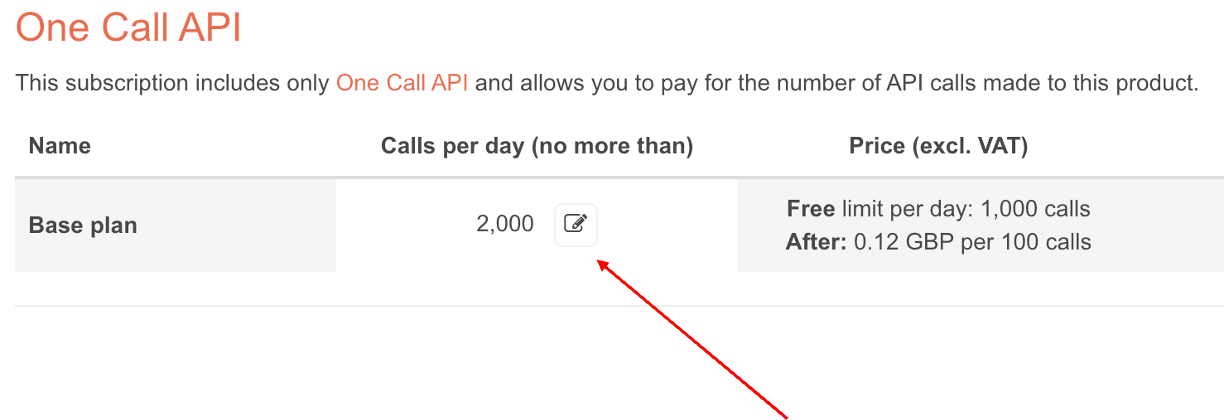
You can receive a "429" error in only one case: if you make several calls that exceed the set limit of calls per day or per month.
Please note that the limit of API calls per day is set by default. You can always change this limit on the "Billing plans" tab. Please see the screen below:
Payment process
Which payment methods we accept?
We accept most major credit and debit cards, as well as digital wallets, including Visa, Mastercard, UnionPay, American Express, Apple Pay, Google Pay, Link by Stripe, WeChat Pay, Alipay+, and Revolut Pay.
Bank transfers are also available for premium accounts. You can select your preferred payment method during the subscription process.
Payments we do not accept
We do not accept cash or check payments.
Is my payment secure?
All transactions made on the OpenWeather website are secure. We use HTTPS secure protocol over the website. We do not collect, store or process any of your payment details.
Where is my invoice?
You can find invoices and transaction history in the 'Payments' section of your settings.
Note that you need to add your company information in the 'Invoice info' tab in your personal account.
For bank transfer payments, our support team send invoices directly to your email. You can always contact us if you have any questions.
What happens after I pay for a subscription?
After receiving your payment, your API key will get activated and you will receive a confirmation email with API endpoints and guides.
How can I upgrade or downgrade my subscription plan?
Please note that you can upgrade or downgrade only one of the professional subscriptions.
If you pay by monthly recurring payments (via payment card):
Please log in to your account on our website, then use the “Subscribe” button underneath the desired plan in your personal account.
You will be charged immediately when you upgrade or downgrade your subscription. Note, that for your automatic subscription there is no any recalculation of payment that has already been done. To avoid double payment, we recommend you to change your subscription plan at the end of the month for which you have paid.
For example, if you have a Startup subscription and your billing payment date is the 15th day of each month, we would recommend to upgrade/downgrade your subscription on the 14th.
If you pay by manual invoice
You can сhange your subscription plan by contacting us.
How can I change my payment details?
To change your credit card details for your OpenWeather account, you have two options depending on your payment method:
- If you are using a credit card directly, please sign in to your account and visit this link to update your payment card details: this link.
- If you have used PayPal, you can update your payment details through your registered PayPal account using: this link. If you paid using a guest PayPal account, you should resubscribe with your API key on the last day of your current subscription to avoid any interruptions or duplicate charges by following: this link.
If you prefer to subscribe directly using your credit card (instead of PayPal), you will need to wait until your current subscription ends before resubscribing again.
If you still have any questions please contact us for assistance and specify your account email.
How can I change information represented on the invoice (company info, address, etc.)?
Please sign in and use this link: https://home.openweathermap.org/invoice_info.
What happens if my payment fails?
If you have subscribed via our website and are paying for your monthly subscription automatically, our system will make several attempts (up to 4) to charge your payment card. These attempts will happen with a minimum of 1-day difference between each charging attempt.
In case we are not able to charge you after the final attempt, your subscription will be cancelled automatically, and your account will be suspended.
You have to contact us for help if your account was suspended.
Personal account
Where can I change my password?
Your password can be changed in the “My profile/User settings” section of our website.
How can I reset my password?
You can reset your password on the “Sign in” page of our website by following the link after the question “Lost your password?” or by clicking "Change password" button at the "User settings" chapter at the "My profile" section of "Personal account" page.
Can I change my account email?
Yes, we can change your account email. Please send us you current email, new email, and your API key.
Can I change the country of my account?
Yes, we can change your country. Please send us the country you need to change to.
I have exceed my subscription limits. How long my account will be suspended?
Our blocking system suspends your account for a couple of hours to several days randomly. If you want to be unlocked immediately, please subscribe to our paid subscriptions.
I want to know how many API calls I do?
For professional subscriptions we do not provide statistics on how many calls the user is making to our APIs. The best way to find how many calls you are making is to add counters on your end, so it could tell you the exact amount of how many times you have sent your request to the API.
For "Pay as you call" subscription plan you can find the statistics of calls usage on the "View usage statistics" button at the "Billing plan" tab in your Personal account.
I want to delete my account; how should I do it?
You can always delete your account in the “My profile/Privacy centre” section of your settings.
Please note:
- Before deleting your account, you'll need to cancel any active paid subscriptions
- Account deletion is permanent and cannot be undone
- Once your account is deleted, all associated data will be permanently removed from our system
How can I change my account type from personal to business?
To change your account type from personal to business, you must first cancel your current subscription.
Follow these steps:
- Sign in to your OpenWeather account
- Go to the Subscriptions page: https://home.openweathermap.org/subscriptions
- Cancel your current subscription and confirm the cancellation
After your subscription has been cancelled, contact us at info@openweathermap.org, and we will assist you with updating your account type.
Please note: Changing your account type is only possible after the current subscription has been canceled.
How can I change the VAT ID for my account?
To update the VAT ID associated with your account, you must first cancel your current subscription.
Follow these steps:
- Sign in to your OpenWeather account.
- Go to the Subscriptions page: https://home.openweathermap.org/subscriptions
- Cancel your current subscription and confirm the cancellation.
After your subscription has been cancelled, contact us at info@openweathermap.org. We will update the VAT ID associated with your account, after which you can subscribe again using the updated billing information.
Please note: Your current subscription must be cancelled before we can update the VAT ID associated with your account.
Why is my account locked?
Your account can be temporarily locked after 5 unsuccessful login attempts to help protect it from unauthorised access.
Here's what you need to know:
- The account remains locked for 1 hour.
- During the lockout period, you cannot sign in or reset your password.
- Once the lockout period ends, you will have 5 new login attempts
License
Can I use OpenWeather’s APIs commercially?
Yes, you can. Please see our pricing page for more details.
How to ensure that I give the attribution to OpenWeather correctly?
For the plans between Free and Professional, the attribution requirement is obligatory. When it is required by your license you should place the following information in the visible part of your solution:
- ‘Weather data provided by OpenWeather’
- Hyperlink to our website https://openweathermap.org/
- OpenWeather logo. We provide a library of different styles to match your application design. You can download them here.
If you have any doubts about your specific scenario, please reach out to our support team and we will be glad to advise.
Technologies
What models do you use?
OpenWeather provides accurate weather data by drawing on trusted sources such as weather stations, satellites, radar systems, and advanced models like GFS, ECMWF, and its own OWHL™️. These partnerships with the UK Met Office and other national meteorological agencies boost reliability, with updates released every 10 minutes to ensure precision. Remarkably, the OWHL™️ model reports less than 1% of temperature predictions deviating by more than 5°C. Widely recognised as a leading provider of short-term forecasts, OpenWeather acknowledges that accuracy diminishes over longer periods due to atmospheric complexity. Thus, while short-term forecasts remain highly reliable, it is prudent to view predictions beyond a week with a degree of caution.
Continuously refining its models using real-time data, OpenWeather delivers reliable forecasts worldwide, covering both remote and densely populated areas. It also offers minute-by-minute precipitation data and hyperlocal insights, establishing itself as a trusted choice for businesses across the globe. You can find out more about OpenWeather model here.
I have a weather station. Can I connect my station with your system?
If you also believe in the significance of climate data in tackling climate and healthcare challenges and would like to contribute to our initiatives, then we invite you to connect your automated weather station to our platform. The accuracy of weather data benefits from enthusiasts from all over the world and we reward these contributions with our Startup plan.
To contribure your data to our system, please use the Weather station API. To get access to the Startup plan, please contact us.
APIs
What are the minimum/maximum temperature fields in the Current Weather API and Forecast Weather API?
In the Current Weather API and Hourly Forecast API:
As it is a current weather data that reflect weather conditions only for the current moment, we add optional statistical parameters the
temp_minandtemp_maxfields to show dispersion of temperature at this current moment. This is the minimum/maximum currently observed temperature or forecast temperature (within large megalopolises and urban areas).In the 16-Day Forecast API and 30-Day Forecast
The
list.temp.minandlist.temp.maxfields are minimum/maximum daily temperature, and show the minimum and maximum temperatures in the day.Which time format and timezone are used?
OpenWeather uses Unix time and the UTC/GMT time zone for all API calls, including current weather, forecast and historical weather data. The
timezone_offsetparameter shows the shift in seconds from UTC. In the One Call API, endpoint version 4.0 response, there is also a timezone parameter that shows the time zone name for the requested location.Why I do not see some parameters in the API response?
If you do not see some of the parameters in your API response, it means that these weather phenomena just have not happened for the selected location at the time of measurement. Only actually measured or calculated data is displayed in an API response.
What is the format of the API response?
The JSON format is used by default. To get data in XML or HTML format, just use “xml” or “html” for the
modeparameter. The HTML format is available for Current Weather API only. For the One Call API, endpoint version 4.0, data is only available in the JSON format. If themodeparameter is omitted, the format is JSON by default.Examples of API calls:
- JSON:
api.openweathermap.org/data/2.5/weather?q=London&{YOUR_API_KEY} - XML:
api.openweathermap.org/data/2.5/weather?q=London&mode=xml&{YOUR_API_KEY} - HTML:
api.openweathermap.org/data/2.5/weather?q=London&mode=html&{YOUR_API_KEY}
- JSON:
What are the weather condition codes and icons?
A list of weather condition codes with icons (range of thunderstorm, drizzle, rain, snow, clouds, atmosphere including extreme conditions such as tornado or hurricane) can be found here.
You are free to use these icons in your own solutions.
How can I specify locations in API calls?
Requesting API calls by geographical coordinates is the most accurate way to specify any location. If you need to convert city names and zip-codes to geo coordinates and the other way around automatically, please use our Geocoding API.
However, some of our APIs support in-built geocoding, which allows users to call weather data by city name, city ID and Zip-code. If the chosen API supports built-in geocoding, then you will find the "Buil-it geocoding" section in the API documentation.
We support over 200,000 cities worldwide and our data is available for any coordinates around the globe. However, we don't recommend using large locations or countries as it will not be weather data for a large location (aggregated data or averages), but weather data for a central point of the territory.
Where can I find a list of City IDs?
For current and forecast products (Current API, Hourly Forecast API, Daily Forecast for 16 days, Climatic forecast for 30 days, 5 day/3 hour forecast data) can be downloaded here.
Please note that you can also make requests to our APIs by using coordinates, ZIP codes, etc. Please refer to documentation of specific API to see all available options.
How to determine polar day and polar night using sunset and sunrise time?
Polar day and polar night are natural phenomenons which occur when day and night respectively lasts more than 24 hours and observed for the northernmost and southernmost regions of Earth. During polar day and polar night time of sunset and sunrise are coincide.
So, if sunset and sunrise time for specified location are the same:
- Polar day will be observed for locations in North hemisphere from March till September and for locations in South hemisphere from September till March
- Polar night will be observed for locations in North hemisphere from September till March and for locations in South hemisphere from March till September
What X, Y tile coordinate numbers are possible for given zoom level in the OpenWeather tiled map?
The following table provides an indication of zoom levels, possible X, Y tile coordinate numbers, the quantity of tiles at each zoom level, and the scale of each level.
Zoom level
Possible X, Y tile coordinate number(only integers are available)
Quantity of tiles
Examples of area to represent
0
1
1
whole world
1
0-1
4
one quarter of the world
2
0-3
16
subcontinental area
3
0-7
64
largest country
4
0-15
256
largest country
5
0-31
1024
large African country
6
0-63
4,096
large European country
7
0-127
16,384
small country, US state
8
0-255
65,536
wide area, large metropolitan area
9
0-511
262,144
wide area, metropolitan area
What is the correlation between solar irradiance and solar irradiation?
The basic definitions of solar power sector are solar irradiation and solar irradiance and are often used interchangeably. However, they are not a synonyms:
Solar irradiation is the total energy received by a surface of the Earth per unit area over a given period of time. It is the amount of radiation (also known as shortwave radiation) passing through a horizontal plane. Solar irradiance is measured in Wh/m2.
Solar irradiance is the surface power density received by a surface of the Earth. Solar irradiance is measured in W/m2.
To convert irradiance to irradiation please use the formula below:
Energy(Wh/m2) = Power(W/m2) * TimeInterval(h)
where energy is a solar irradiation; power is a solar irradiance.
For energy data values for 1 h period of TimeInterval = 1
For energy data values for 15 min period of TimeInterval = 0.25
For more details about what technologies, algorithms, etc. are behind the Solar Irradiance & Energy Prediction service can be found here.
Weather related symbols
Wind cardinal and degree directions correlation
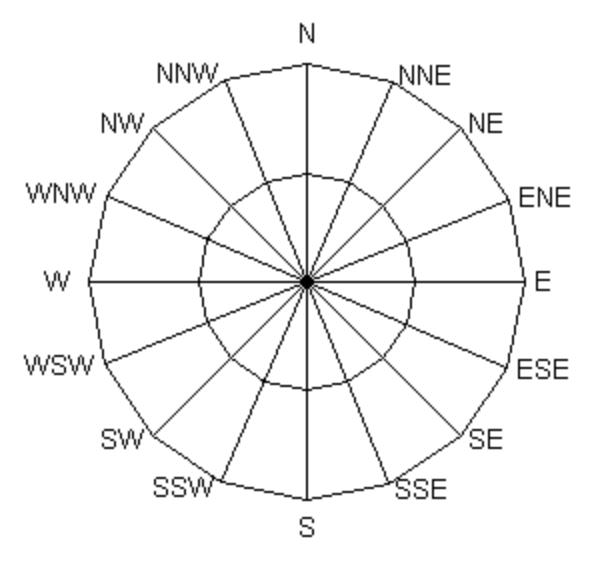
Wind direction is reported as an orientation from where the wind is blowing. The directions of the wind is determined at the geographical system of coordinates and could be represented in degrees and cardinals terms. wind direction in degrees -azimuth degrees, i.e., in a numerical measure that moves around the Rose of the Winds in a clockwise circle from 0 degrees (N) to 360 degrees (N).Wind direction in cardinals - direction based on are the four main compass directions: north, south, east, and west. Relative to north, the directions east, south, and west are at 90 degree intervals in the clockwise direction.Please find below the table with correlations between cardinal and degree wind directions:
Cardinal Direction
Degree Direction
N
348.75-11.25
NNE
11.25-33.75
NE
33.75-56.25
ENE
56.25-78.75
E
78.75-101.25
ESE
101.25-123.75
SE
123.75-146.25
SSE
146.25-168.75
S
168.75-191.25
SSW
191.25-213.75
SW
213.75-236.25
WSW
236.25-258.75
W
258.75-281.25
WNW
281.25-303.75
NW
303.75-326.25
NNW
326.25-348.75
API errors
API calls return an error 400000
You can get the 400000 error when you request data for a period not covered by your subscription. Access to specific time ranges in each product depends on your subscription level. You can check the allowed data range for each subscription and product on the Pricing page. If you need access to data beyond the permitted range, consider upgrading your plan.
API calls return an error 401
You can get the error 401 in the following cases:
- You did not specify your API key in API request.
- Your API key is not activated yet. Within the next couple of hours, it will be activated and ready to use.
- You are using wrong API key in API request. Please, check your right API key in personal account.
- You are using a Free subscription and try requesting data available in other subscriptions . For example, 16 days/daily forecast API, any historical weather data, Weather maps 2.0, etc). Please, check your subscription in your personal account.
API calls return an error 404
You can get this error when you specified the wrong city name, ZIP-code or city ID. For your reference, this list contains City name, City ID, Geographical coordinates of the city (lon, lat), Zoom, etc.
You can also get the error 404 if the format of your API request is incorrect. In this case, please review it and check for any mistakes. To see examples of correct API requests, please visit the Documentation of a specific API and read the examples of API calls there.
API calls return an error 429
You can recieve this error in the following cases:
- If you have a Free plan of Professional subscriptions and make more than 60 API calls per minute (surpassing the limit of your subscription). To avoid this situation, please consider upgrading to a subscription plan that meets your needs or reduce the number of API calls in accordance with the limits.
API calls return errors 500, 502, 503 or 504
In case you receive one of the following errors 500, 502, 503 or 504 please contact us for assistance. Please enclose an example of your API request that receives this error into your email to let us analyze it and find a solution for you promptly.